This is default featured post 1 title
Go to Blogger edit html and find these sentences.Now replace these sentences with your own descriptions.This theme is Bloggerized by Lasantha Bandara - Premiumbloggertemplates.com.
This is default featured post 2 title
Go to Blogger edit html and find these sentences.Now replace these sentences with your own descriptions.This theme is Bloggerized by Lasantha Bandara - Premiumbloggertemplates.com.
This is default featured post 3 title
Go to Blogger edit html and find these sentences.Now replace these sentences with your own descriptions.This theme is Bloggerized by Lasantha Bandara - Premiumbloggertemplates.com.
This is default featured post 4 title
Go to Blogger edit html and find these sentences.Now replace these sentences with your own descriptions.This theme is Bloggerized by Lasantha Bandara - Premiumbloggertemplates.com.
This is default featured post 5 title
Go to Blogger edit html and find these sentences.Now replace these sentences with your own descriptions.This theme is Bloggerized by Lasantha Bandara - Premiumbloggertemplates.com.
Friday, 13 October 2017
cara mudah merubah file word (doc/docx) menjadi pdf+
cara merubah huruf besar menjadi kecil atau sebaliknya di word
mengatur pilihan paste
cut paste banyak item
find and replace
membuat format berbeda secara otomatis
mengatasi hilangnya atau kerusakan dokumen
kalkulator tersembunyi

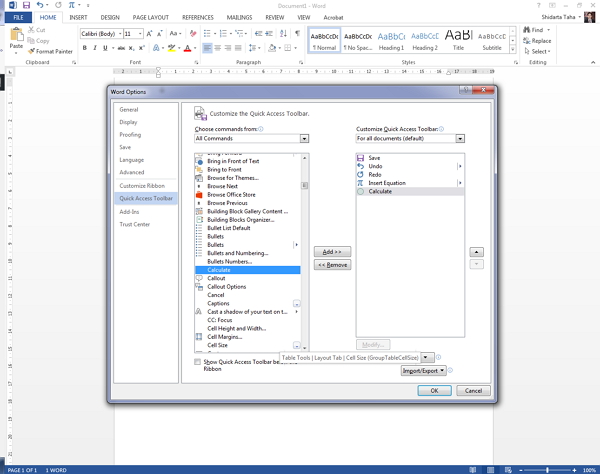
Microsoft Word memiliki kalkulator tersembunyi yang dapat menangani operasi aritmatika sederhana yang kamu ketikkan di MS Word. Ingat, hanya operasi sederhana. Kamu akan kecewa jika menggunakannya untuk perhitungan sinus cosinus yang ribet.
Cara memunculkan kalkulator ini adalah dengan mengakses Word Options > Quick Access Toolbar. Pilih All Commands kemudian cari fungsi Calculate dari tabel yang ditampilkan. Setelah itu tambahkan fungsi tersebut ke Quick Access Toolbar dengan menekan OK.
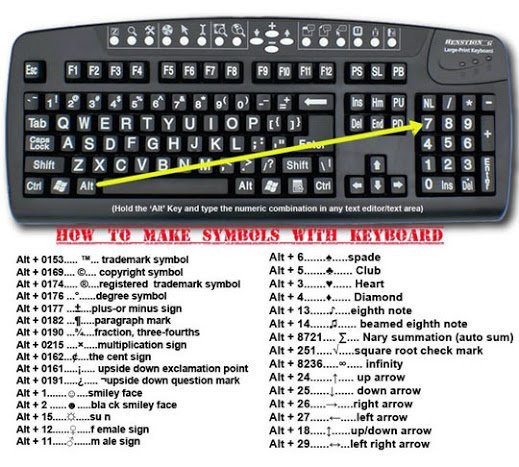
memasukkan karakter khusus
menambah filler
temukan resolusi yang efektif
Untuk menemukan resolusi efektif gambar dalam publikasi Anda, lakukan hal berikut:
Thursday, 12 October 2017
mengurangi grafik beresolusi tinggi
membungkus teks di sekitar klip
pemutaran dan pembalikan

pengubahan kontras dan kecerahan
-
Pilih klip.
-
Pada toolbar Gambar, lakukan salah satu hal berikut ini:
-
Untuk menambah kecerahan, klik Tambah Kecerahan
.
-
Untuk mengurangi kecerahan, klik Kurangi Kecerahan
.
-
Untuk menambah kontras, klik Tambah Kontras
.
-
Untuk mengurangi kontras, klik Kurangi Kontras
-
Untuk menambah kecerahan, klik Tambah Kecerahan